Summary
If the question is how to factory reset my phone safely in 2026, the answer depends on both device type and purpose. A proper reset removes personal data, restores original system settings, and—when done correctly—prevents the next owner from accessing private information. Whether using an iPhone or an Android device, preparation matters just as much as the reset itself.
Why Resetting a Phone Is More Serious Than It Sounds
Factory resets used to be a simple troubleshooting step. In 2026, they are closely tied to digital identity protection, resale value, cloud synchronization, and theft safeguards. Modern smartphones are deeply integrated with Apple ID, Google Account, banking apps, passkeys, and biometric authentication. A reset that skips one preparation step can leave activation locks in place or, worse, expose personal data.
Most online guides reduce the process to “go to Settings and tap Erase.” That approach overlooks a critical reality: today’s smartphones are security hubs. Resetting one improperly can create friction for the next user or vulnerabilities for the previous owner.
The goal is no longer just restoring performance. It is ensuring data separation, account disconnection, and secure erasure.
When a Factory Reset Is Actually the Right Solution
A reset is often treated as a cure-all, but it is best reserved for specific situations:
- Persistent software instability after updates
- Severe performance degradation not solved by storage cleanup
- Preparing a device for resale or trade-in
- Removing malware or configuration corruption
- Resolving repeated authentication or system-level errors
However, resetting is not ideal if the issue is hardware-related, such as battery degradation or physical storage failure. In those cases, wiping the device will not restore performance.
A key misconception is that factory resetting automatically “makes a phone like new.” It restores software to default state—but it does not reverse battery wear, network hardware aging, or screen burn-in.
Understanding that distinction prevents unrealistic expectations.
Before You Reset: The Step Most People Skip
Preparation determines whether a reset is smooth or problematic.
1. Back Up First — Always
Both iOS and Android devices sync heavily with the cloud. Even so, assumptions are dangerous. A manual backup ensures contacts, photos, messages, app data, and authentication tokens are preserved.
On iPhone devices, backups typically run through iCloud or a Mac/PC using Finder or iTunes. On Android devices, Google Backup handles most app and system data, but certain messaging apps and local files may require manual export.
2. Sign Out of Accounts Properly
This is where many resale problems begin.
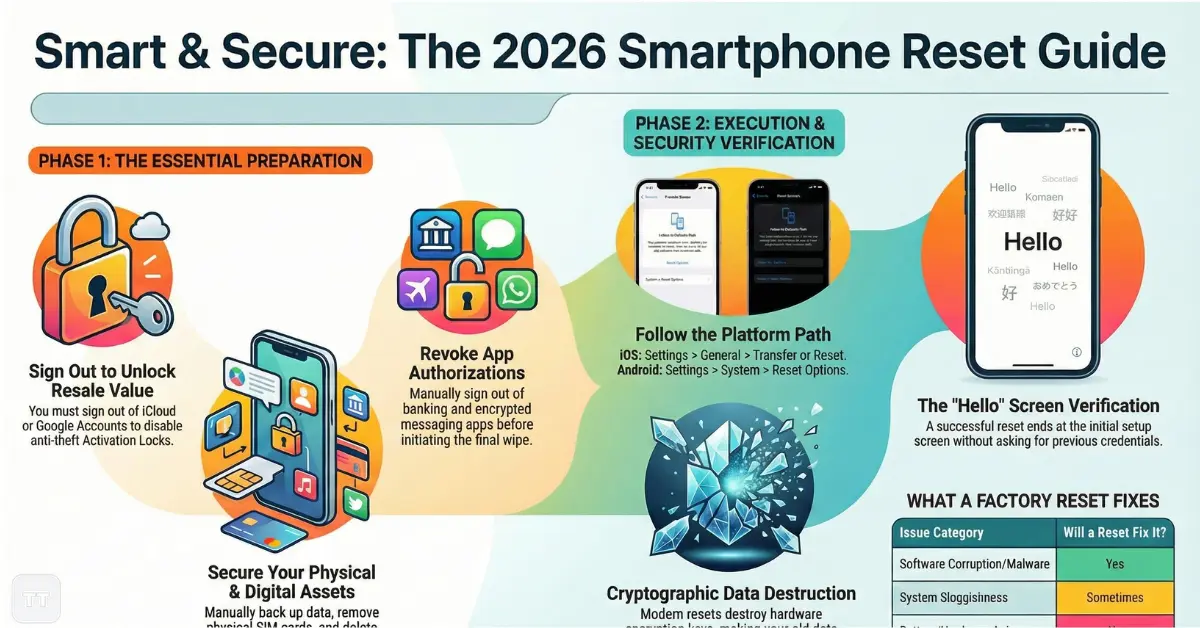
On Apple devices, signing out of iCloud disables Activation Lock. Without this step, the next user cannot activate the device—even after a reset.
On Android devices, removing the Google account prevents Factory Reset Protection (FRP) from locking the next owner out.
Skipping this step creates unnecessary support issues and delays in resale.
3. Remove eSIM and Physical SIM
Deleting an eSIM profile or removing the SIM card ensures no carrier data remains associated with the device.
4. Disable “Find My” or Device Tracking
Security systems are designed to prevent theft. They must be intentionally disabled before transferring ownership.
How to Factory Reset iPhone Devices in 2026
For users searching how to factory reset iPhone models safely, the steps are straightforward—but sequence matters.
After backing up and signing out of Apple ID:
- Open Settings
- Tap General
- Scroll to Transfer or Reset iPhone
- Select Erase All Content and Settings
- Confirm identity using Face ID, Touch ID, or passcode
- Confirm erasure
The device will restart and display the initial setup screen.
A Critical Detail Many Overlook
If “Find My iPhone” remains enabled or Apple ID is not signed out, the device will prompt for the original credentials during setup. For resale purposes, this effectively makes the phone unusable.
A proper reset includes verifying that the Hello screen appears without asking for previous credentials.
How to Factory Reset Android Phone Models
The process varies slightly by manufacturer, but the structure remains similar.
After backing up and removing the Google account:
- Open Settings
- Navigate to System
- Tap Reset Options
- Select Erase all data (factory reset)
- Confirm PIN or biometric authentication
- Confirm erase
The device will reboot and load the setup wizard.
[IMAGE / DIAGRAM: Android reset path in system settings]
Brand Differences That Matter
Samsung devices may label this under General Management, while Pixel devices follow a cleaner system layout. Some Android skins add an extra confirmation step for secure wipe.
What matters most is ensuring the Google account is removed beforehand to prevent Factory Reset Protection.
Reset Phone Before Selling: Security Considerations in 2026
When preparing to reset phone before selling, the objective is not just deletion—it is data irreversibility.
Modern smartphones use hardware-level encryption. Once a reset is performed, the encryption keys are destroyed, making stored data inaccessible. This makes secure erasure far stronger than older devices from a decade ago.
However, two overlooked steps improve security further:
- Sign out of all messaging platforms (especially encrypted ones)
- Remove banking and authentication apps manually before reset
This ensures session tokens are revoked before device wipe.
Resale platforms in the US and UK increasingly verify device readiness. Phones still tied to accounts may be rejected or downgraded in value.
Factory Reset Without Password: What Is Actually Possible?
One of the most searched concerns involves performing a factory reset without password access.
There are two scenarios:
- The device belongs to the user but the screen passcode is forgotten.
- The device was acquired secondhand and remains locked.
For legitimate owners, recovery mode can restore access.
On iPhone devices, connecting to a Mac or PC and entering recovery mode allows a full restore via Finder or iTunes.
On Android devices, hardware button combinations (varies by brand) allow reset through recovery mode.
However, activation locks remain enforced. Apple’s Activation Lock and Google’s Factory Reset Protection are designed specifically to prevent unauthorized access after a wipe.
This means resetting does not bypass ownership verification.
Any service claiming otherwise often operates in legally questionable territory.
Does a Factory Reset Really Erase All Data from Phone Securely?
The short answer is yes—on modern devices.
Smartphones released in the last several years use full-disk encryption by default. Once encryption keys are deleted during reset, the stored data becomes cryptographically unreadable.
This differs from older computers where data remnants could be recovered after deletion.
That said, extremely sensitive enterprise environments sometimes require additional steps, such as remote device deregistration from management systems.
For standard consumers in the US, UK, AU, or EU, a properly executed reset is considered secure for resale or recycling.
Performance Myths: Will Resetting Fix a Slow Phone?
Sometimes. Not always.
Factory resets can improve performance when:
- Software corruption has accumulated
- Background services conflict
- Malware or rogue apps consume resources
But they do not fix:
- Aging batteries
- Thermal throttling caused by hardware degradation
- Insufficient RAM limitations
In many cases, clearing storage or uninstalling unused apps yields similar improvements without full reset.
A reset should be viewed as a system-level troubleshooting step—not routine maintenance.
The Hidden Tradeoff: Convenience vs. Friction
A factory reset offers a clean slate. However, it also means:
- Reinstalling apps manually
- Reconfiguring biometric authentication
- Logging back into financial accounts
- Re-authorizing two-factor authentication systems
For users deeply integrated into password managers and passkeys, this can take longer than expected.
In professional settings, this downtime may disrupt workflow.
Therefore, resetting should be intentional—not impulsive.
When a Partial Reset Is Smarter
Sometimes erasing all data is unnecessary.
Both iOS and Android allow:
- Resetting network settings
- Resetting keyboard dictionary
- Resetting location & privacy settings
If the issue involves Wi-Fi instability or Bluetooth pairing problems, a network reset may solve the issue without deleting personal data.
This approach is often overlooked but highly effective.
What Happens After the Reset Screen Appears?
A proper reset ends with the device displaying the initial setup screen.
At this point:
- The phone is no longer linked to personal data
- Cloud accounts are removed
- System configuration returns to default
If selling, power off the device at this stage.
If keeping it, restore from backup during setup.
Broader Context: Why Reset Protocols Have Evolved
Smartphones are no longer just communication devices. They store biometric identifiers, payment credentials, digital IDs, and authentication tokens.
Security frameworks such as Apple’s Secure Enclave and Android’s Titan security architecture are designed to prevent data extraction after reset.
This evolution means factory resets are more secure than ever—but also more strict about ownership verification.
That strictness protects users from theft but requires attention to detail during legitimate transfers.
Frequently Asked Questions
Does a factory reset remove viruses or malware?
Yes, in most cases it does. A factory reset removes installed applications and system modifications, eliminating typical malware unless the device firmware itself is compromised, which is rare.
Can someone recover data after a factory reset?
No, not under normal conditions. Modern encrypted smartphones render previous data inaccessible once encryption keys are destroyed during reset.
Should the SIM card be removed before resetting?
Yes. Removing the SIM prevents carrier-linked data from remaining associated with the device and avoids accidental account linkage.
How long does a factory reset take?
Usually between 5 and 15 minutes. The time depends on storage size and device model, but most modern phones complete the process quickly.
Will resetting improve battery life?
Not directly. If battery drain was caused by software conflict, it may improve. If caused by battery aging, replacement is the only solution.
Is resetting safe before recycling a phone?
Yes, provided accounts are signed out and the reset completes successfully. For added confidence, verify the setup screen appears before disposal.
Conclusion: Reset With Intention, Not Impulse
A factory reset in 2026 is not just a troubleshooting button—it is a security protocol. When executed properly, it protects personal identity, ensures resale readiness, and restores system stability. When rushed or incomplete, it can lock devices, reduce resale value, or create avoidable complications.
The key insight is simple: preparation determines outcome. Backups, account removal, and verification steps matter more than the reset itself.
Handled thoughtfully, resetting a smartphone is one of the most effective tools for digital hygiene and secure device transitions.