What Makes iOS 26.2 Different From Every Other Apple Update
Your iPhone shouldn’t surprise you. It shouldn’t drain overnight for no reason, hesitate when switching apps, or disconnect from Bluetooth the moment you walk through a door. Yet after iOS 26 launched, thousands of users reported exactly these frustrations.
iOS 26.2 exists to fix what iOS 26 broke.
Unlike feature-heavy releases designed for keynote presentations, this midcycle update targets the friction points that accumulate when ambitious system changes meet real world usage patterns. Apple analyzed millions of data points from devices experiencing battery inconsistencies, connectivity drops, and performance degradation—then built an update specifically to resolve them. For users who delayed updating due to stability concerns or those frustrated with current performance, iOS 26.2 represents the maturation point where iOS 26 finally delivers on its original promise.
Why This Update Matters More Than the Version Number Suggests
The Real Story Behind Point Releases
Major iOS versions grab headlines with redesigned interfaces and flagship features. But industry veterans know the truth: the .2 release is where an operating system actually becomes reliable. iOS 26 introduced aggressive changes to on-device intelligence, background app behavior, and power efficiency algorithms. These shifts expanded capabilities but exposed edge cases that only surfaced under diverse real-world conditions—different device ages, usage patterns, network environments, and installed app combinations. By the time iOS 26.2 arrived, Apple had collected enough telemetry to identify systemic issues rather than isolated incidents. This update addresses those patterns with surgical precision.
Apple’s Strategic Shift: Invisible Improvements Over Flashy Features
iOS 26.2 signals a broader philosophy change at Apple: prioritizing polish over novelty. After years of feature-heavy releases, the company appears to acknowledge that users keeping devices longer need consistency more than experimental capabilities. This approach manifests in what Apple calls “invisible improvements”—changes users feel rather than see. Animations don’t look different; they drop fewer frames. Apps don’t open faster on paper; the system simply prioritizes foreground tasks more intelligently.
What Actually Changes in iOS 26.2: Features and Improvements
1. System Responsiveness: Smoother Performance Across Device Generations
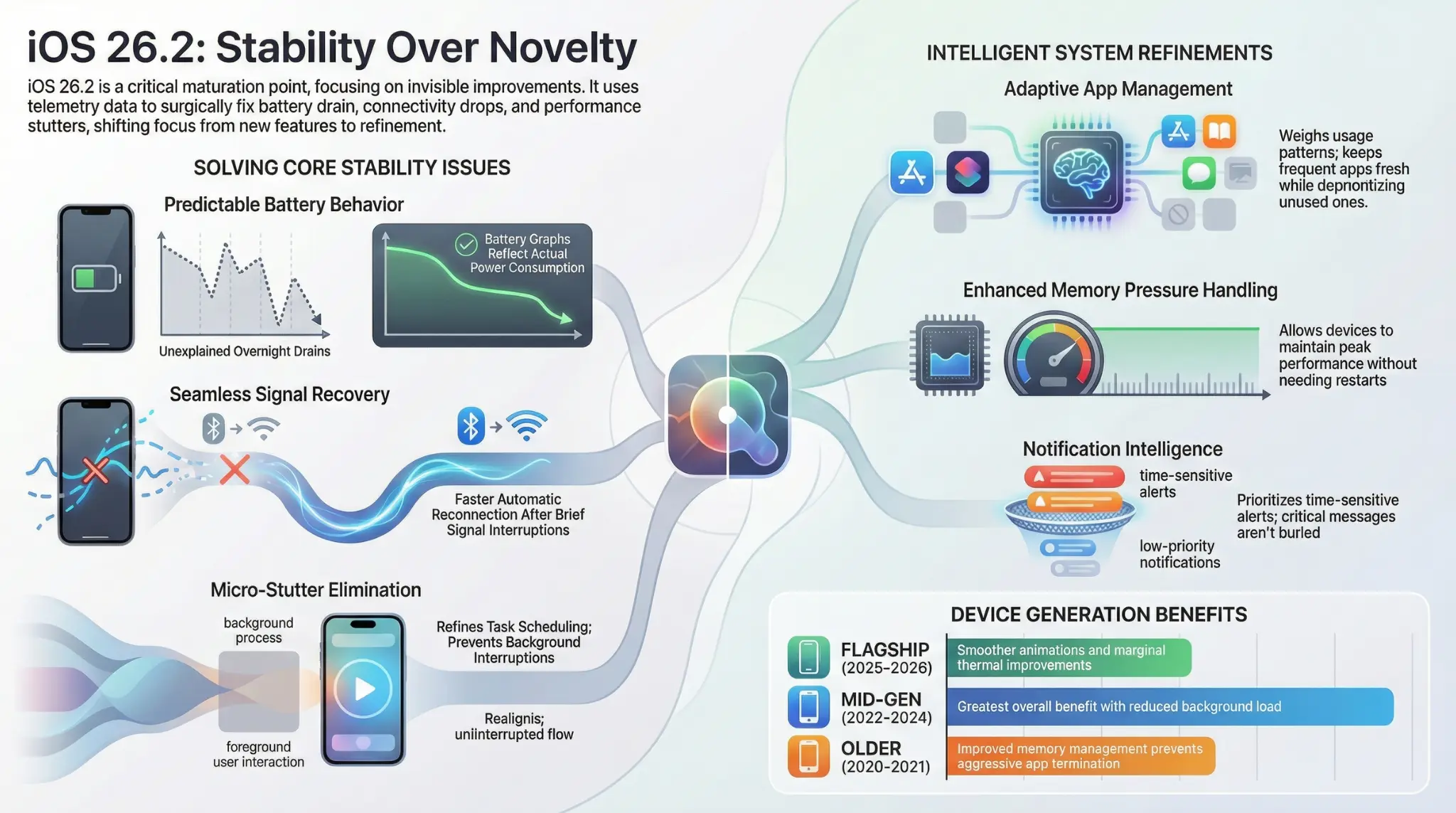
The Problem: Earlier iOS 26 versions introduced micro-stutters when switching apps, pulling down Control Center, or invoking Siri—particularly on devices two to four generations old. The Solution: iOS 26.2 refines task scheduling so short user interactions aren’t interrupted by background processes like indexing, syncing, or app refresh. The system now distinguishes between critical foreground tasks and deferrable background work. Who Benefits Most: Users with iPhone models from 2022-2024 see the greatest improvement, though flagship devices gain marginal smoothness in animation consistency.
2. Intelligent Background App Management
One of the most impactful yet understated changes involves how iOS handles apps running in the background. Key Improvement: Instead of applying uniform resource limits, the system now weighs recent user interaction patterns. Apps opened frequently retain background privileges longer, while rarely used apps are deprioritized more aggressively. Real-World Impact:
- Messaging apps stay fresher without constant manual refreshes
- Fitness trackers maintain more accurate background activity recording
- Navigation tools preserve location context between app switches
- Battery life improves as unused apps consume fewer resources
This adaptive approach reduces surprise refreshes without sacrificing the functionality users actually rely on daily.
3. Battery Behavior: Predictability Over Promises
Apple doesn’t claim iOS 26.2 magically extends battery life. The actual improvement is more valuable: predictable, consistent battery behavior. What Was Fixed:
- Eliminated sudden overnight drains on idle devices
- Corrected battery graphs that misreported screen-on usage
- Recalibrated background activity tracking to reflect actual consumption
- Reduced unexplained dips during light usage periods
Technical Changes: The update refines how background services wake up, particularly location-based processes and cloud syncing. Wake events are now batched more intelligently, reducing the frequency of power-intensive operations. Expected Outcome: You won’t necessarily get an extra hour of screen time, but you’ll stop wondering why your phone lost 20% charge while you slept.
4. Notification Intelligence: Time-Sensitive Alerts Finally Surface
iOS 26.2 refines notification grouping logic without redesigning the visual interface. The Adjustment: Time-sensitive alerts are less likely to be buried beneath low-priority notifications. The system now delays non-urgent notifications more intelligently rather than treating everything as equally important. Why This Matters: Critical alerts from calendar events, messaging apps, or security notifications arrive promptly instead of being queued behind promotional emails and social media updates.
5. Connectivity Stability in Real-World Conditions
Bluetooth and Wi-Fi Reliability: Rather than boosting raw connection speeds, Apple focused on reconnection behavior—how quickly devices recover after brief signal loss. Targeted Improvements:
- Faster automatic reconnection after signal interruption
- More predictable behavior in dense network environments
- Reduced need for manual Bluetooth/Wi-Fi toggling
- Better handoff between network access points
Who Benefits: Users in urban areas with overlapping networks, commuters on public transit, and anyone working in offices with complex Wi-Fi infrastructure.
Critical Bug Fixes That Restore Daily Reliability
1. App Stability and System Service Conflicts
Several third-party apps that relied on system-level frameworks experienced crashes under iOS 26, particularly during multitasking or memory-intensive operations. Resolution: iOS 26.2 resolves conflicts related to memory allocation and background execution limits. These fixes improve stability across categories including productivity apps, media editing tools, and enterprise software.
2. Memory Pressure Management
Previous Issue: Devices slowed significantly after several days without a restart, requiring weekly reboots to maintain performance. iOS 26.2 Fix: Improved memory pressure handling allows devices to maintain consistent performance during extended uptime. The system better manages RAM allocation, reducing the frequency of aggressive app termination.
3. Touch Responsiveness and UI Accuracy
Apple adjusted touch target recognition in system menus, particularly within Settings and accessibility controls. While seemingly minor, this change improves interaction accuracy on larger displays and for users with motor accessibility needs. Evidence of Purpose: These refinements suggest iOS 26.2 was partially shaped by long-term accessibility testing rather than short-term feature marketing.
Device Compatibility and Performance Expectations
Supported Devices
iOS 26.2 supports the same device range as iOS 26, but compatibility doesn’t mean identical performance. Performance Tier Breakdown: Flagship Models (2025-2026):
- Faster system indexing
- Smoother animations at higher frame rates
- Marginal thermal improvements during sustained workloads
Mid-Generation Devices (2022-2024):
- Greatest overall benefit
- Reduced background load
- Improved thermal management during navigation and video calls
- More consistent responsiveness in everyday tasks
Older Supported Models (2020-2021):
- Fewer slowdowns during prolonged use
- Better memory management prevents aggressive app termination
- Maintains performance longer between restarts
Expected Installation Size and Time
- Download Size: Moderate (varies by device model)
- Installation Time: 15-25 minutes on stable Wi-Fi
- Storage Requirement: Ensure at least 5-7GB free space for smooth installation
Installation Guide: What to Expect and How to Avoid Common Issues
Standard Installation Process
For most users, updating follows the typical over-the-air process:
- Settings → General → Software Update
- Download and verify the update
- Installation begins (device will restart)
- Setup completes automatically
Common Installation Problems and Solutions
Stalled Downloads or “Preparing Update” Screens: Root Causes:
- Limited available storage combined with cached system data
- Background processes delayed by low power mode
- Network interruptions during verification
Solutions:
- Free up at least 5-7GB of storage
- Temporarily disable Low Power Mode
- Ensure stable Wi-Fi connection
- Restart device and retry update
- Critical: Patience matters—avoid force-interrupting the process
Prolonged Verification Steps: Normal for devices with extensive update histories or large app libraries. Allow extra time rather than canceling mid-process.
Temporary Overheating During Installation: Expected behavior during intensive system operations. Ensure device isn’t in direct sunlight or covered by cases that trap heat.
When to Update & When to Wait
Install iOS 26.2 Immediately If:
- You experienced battery drain issues on earlier iOS 26 versions
- Bluetooth or Wi-Fi connectivity has been unreliable
- Apps frequently crash or system UI feels sluggish
- You delayed updating due to stability concerns
Consider Waiting Briefly If:
- You rely on highly specialized enterprise apps without confirmed compatibility
- Your workflow depends on legacy software or region-specific features
- You operate mission-critical systems that require vendor approval for OS updates
Important Context: This recommendation prioritizes timing over fear. No widespread compatibility issues have emerged, but caution remains reasonable in specialized environments.
For General Users: Update Now
The risk of remaining on earlier iOS 26 versions now outweighs the risk of updating. Bug fixes and stability improvements address issues affecting broad user populations.
How iOS 26.2 Fits Apple’s Long-Term Software Strategy
Extending Device Longevity
By optimizing performance on older hardware, iOS 26.2 allows users to keep devices longer before hardware upgrades become necessary. This aligns with environmental goals and user expectations around device value.
Building Stable Foundations for Future Releases
The focus on system stability suggests upcoming iOS versions will build on a more reliable baseline, reducing the need for emergency patches later in development cycles.
Quality Over Quantity in Feature Development
Rather than pushing experimental features mid-cycle, Apple appears committed to strengthening core systems. This approach benefits users who prioritize consistency over novelty.
Tradeoffs and Limitations Worth Understanding
More Conservative Background Behavior
Some users may notice slightly delayed updates from rarely used apps. While this improves overall battery life, apps that were previously aggressive about background refresh may now update less frequently. Example: A news app opened once weekly might not refresh in the background as often as before.
No Major Visual Changes or Customization Options
Users expecting visible new features or interface redesigns will find iOS 26.2 underwhelming at first glance. The update’s value becomes apparent over days and weeks, not immediately after installation.
Not a Universal Performance Cure
Devices at the lower end of the supported list shouldn’t expect dramatic speed improvements. The update prevents degradation and improves consistency—it doesn’t transform aging hardware.
Frequently Asked Questions
Does iOS 26.2 significantly improve battery life?
Not universally. Battery behavior becomes more consistent and predictable, particularly overnight. Most users notice fewer unexplained drains rather than dramatic increases in screen time.
Is iOS 26.2 safe to install on older iPhones?
Yes, for most supported models. Older devices often benefit more due to reduced background load and improved memory handling.
What should I do if the update gets stuck during installation?
Wait first—many apparent stalls resolve themselves. If issues persist after 30+ minutes, ensure adequate free storage and restart the update process. Avoid force-interrupting unless absolutely necessary.
Does iOS 26.2 add major new features?
No. This is a refinement update focused on stability, performance tuning, and bug fixes rather than headline features.
Can iOS 26.2 fix issues caused by earlier iOS 26 updates?
In many cases, yes. Battery drain, connectivity problems, and app instability reported in early iOS 26 versions are directly addressed.
Which devices benefit most from iOS 26.2?
Mid-generation iPhones (2022-2024) see the greatest overall improvement, though all supported devices gain stability and consistency benefits.
Next Steps: What to Do After Reading This Guide
If You’re Ready to Update:
- Back up your device via iCloud or computer
- Free up storage to ensure at least 5-7GB available
- Connect to stable Wi-Fi and a power source
- Navigate to Settings → General → Software Update
- Allow 15-25 minutes for download and installation
If You’re Still Deciding:
- Monitor feedback from users with similar device models and use cases
- Check with specialized app vendors if you rely on enterprise or niche software
- Revisit this decision in 1-2 weeks as more real-world data emerges
After Installing:
- Allow 24-48 hours for system indexing and optimization to complete
- Monitor battery behavior over several charge cycles before forming conclusions
- Restart your device if performance seems inconsistent initially
Final Takeaway: Why Quiet Updates Often Matter Most
iOS 26.2 won’t generate viral social media posts or dominate tech headlines. Its value lies in reliability, polish, and the feeling that your device simply works as it should. For an operating system used millions of times daily, that kind of improvement matters more than most feature announcements. It transforms promising but uneven software into something genuinely dependable—and that dependability shapes whether users trust their devices months after the update hype fades. This is the update that completes iOS 26, turning ambitious system changes into stable, everyday performance. For users who value devices that fade into the background and simply work, iOS 26.2 delivers something more valuable than novelty: confidence.
Last Updated: January 2026 | Compatible Devices: All iOS 26-supported iPhones and iPads | Update Type: Stability & Performance Release