Summary
Many users searching for Android apps slowing down phone performance often assume aging hardware is the cause, but in reality, certain apps quietly consume resources in the background. Identifying these apps—and understanding how they impact system behavior—can significantly improve speed, battery life, and overall responsiveness without upgrading the device.
Why a Fast Phone Can Suddenly Feel Slow
A phone that once felt smooth can gradually become frustratingly sluggish, often without any major changes in usage. This shift is rarely caused by a single issue. Instead, it reflects the cumulative effect of apps running background processes, syncing data continuously, or consuming system memory inefficiently.
What makes this more difficult is that many of these apps appear harmless—or even essential. They don’t crash, they don’t throw errors, and they often deliver real value. Yet behind the scenes, they quietly compete for CPU cycles, RAM, and battery, creating a bottleneck that impacts everything else.
Most discussions about why an Android phone is slow suddenly focus on storage or updates. What they miss is the behavioral layer of apps—how they run when not in use.
The Hidden Pattern Behind Performance Drain
Not all apps slow down a phone in obvious ways. The real issue lies in how frequently they wake the system, request data, or maintain active processes.
There are three common behaviors that define apps that drain Android performance:
- Constant background syncing (notifications, feeds, updates)
- Persistent services running even when unused
- Poor optimization or aggressive resource usage
The key insight is this: performance degradation is rarely about one “bad app.” It’s about a group of apps collectively stressing the system in small but continuous ways.
1. Social Media Apps That Never Truly Close
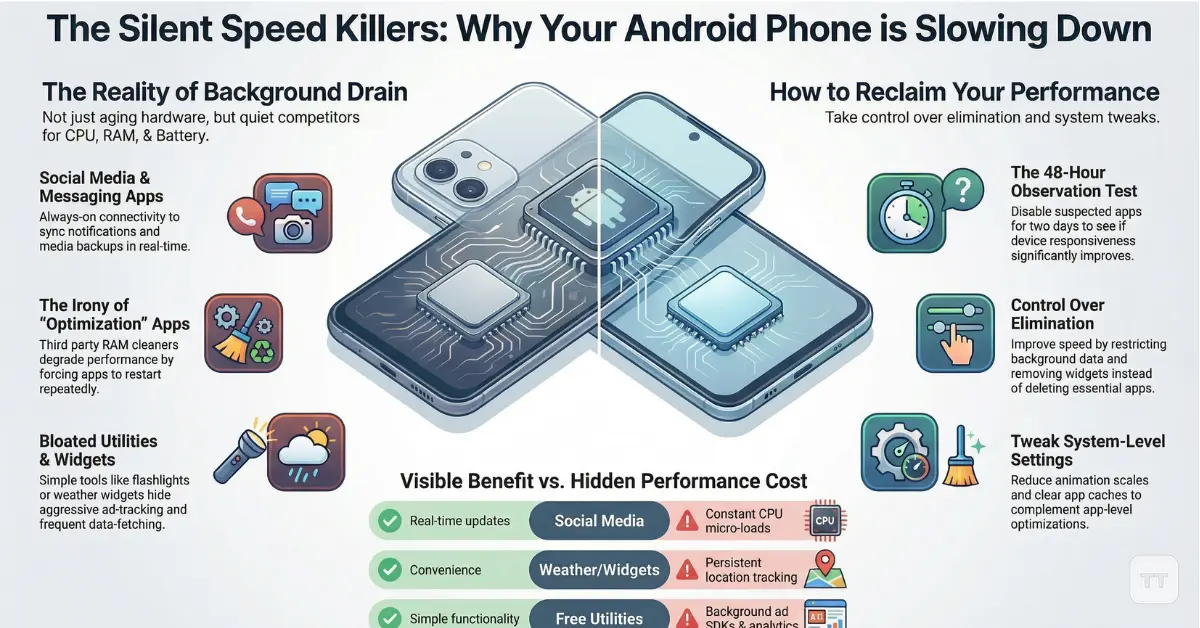
Social media platforms are among the most resource-intensive apps—not just when actively used, but especially when idle.
These apps continuously:
- Refresh feeds
- Sync notifications
- Track engagement activity
- Preload content
Even when closed, they often remain active in the background, contributing heavily to background apps slowing phone performance.
What makes this particularly impactful is frequency. A single refresh cycle may seem insignificant, but repeated dozens or hundreds of times per day, it creates constant micro-loads on the processor.
Insight: The perceived slowdown is less about heavy usage and more about uninterrupted background activity.
2. “Optimization” Apps That Do the Opposite
Ironically, many so-called Android performance optimization apps can degrade performance instead of improving it.
These apps typically:
- Run continuous monitoring services
- Clear memory aggressively (forcing reloads)
- Display ads or overlays
- Duplicate built-in system functions
Modern Android systems already manage memory efficiently. When third-party apps interfere, they often disrupt this balance, leading to more app reloads and higher CPU usage.
Overlooked detail: RAM cleaners can actually make a phone feel slower by forcing apps to restart repeatedly instead of staying cached.
3. Weather & Widget Apps with Constant Updates
Weather apps seem lightweight, but many are designed to update frequently—sometimes every few minutes.
This involves:
- Location tracking
- Data fetching from servers
- Widget refreshes on the home screen
When multiple widgets are active, the effect multiplies. Each widget becomes a mini background service.
The result is subtle but consistent pressure on battery and CPU, especially on mid-range devices.
Tradeoff: Convenience and real-time data come at the cost of persistent background activity.
4. Free Utility Apps Packed with Ads & Tracking
Flashlight apps, file cleaners, QR scanners—many of these fall into a category where functionality is simple, but implementation is bloated.
These apps often:
- Include multiple ad SDKs
- Track user behavior
- Run background analytics
- Request unnecessary permissions
The core function may take seconds to use, but the app continues operating long after.
Misconception correction: It’s not the feature that slows the phone—it’s the hidden processes supporting monetization.
5. Messaging Apps with Heavy Sync & Backup Features
Messaging apps are essential, but some are designed with always-on connectivity and cloud integration.
They frequently:
- Sync chats in real time
- Upload media backups
- Maintain active network connections
- Trigger notifications constantly
For users in multiple group chats or with media-heavy usage, this can significantly impact performance.
Important distinction: Messaging apps are rarely optional—but their settings often are. Default configurations tend to prioritize connectivity over efficiency.
When “More Apps” Becomes the Real Problem
It’s not uncommon for users to install dozens—or even hundreds—of apps over time. Individually, they may seem harmless. Collectively, they create a system that is constantly active, even when the user isn’t.
This leads to:
- Increased RAM pressure
- More background services
- Higher battery drain
- Slower app switching
The real issue isn’t just identifying apps to remove—it’s understanding how many apps the device can realistically handle without compromise.
How to Identify What’s Actually Slowing Your Phone
Rather than guessing which apps are responsible, a more effective approach is to observe behavior patterns.
Signs of problematic apps include:
- High battery usage in system settings
- Frequent background activity
- Excessive data consumption
- Slow app switching or lag after unlocking
A practical way to approach this is to temporarily uninstall or disable suspected apps and observe performance changes over 24–48 hours.
Decision insight: If removing an app makes the phone feel noticeably smoother, it was likely contributing more than expected—even if it seemed minor.
Removing Apps vs. Changing How They Behave
Many guides focus on how to remove apps to speed up Android, but removal isn’t always necessary—or practical.
In many cases, performance can be improved by:
- Disabling background data
- Restricting battery usage
- Turning off auto-sync
- Removing unnecessary widgets
This approach is especially useful for essential apps that cannot be uninstalled.
Key idea: Optimization is often about control, not elimination.
The Subtle Tradeoff Most Users Miss
Improving performance often comes at the cost of convenience.
For example:
- Fewer notifications → less real-time awareness
- Restricted background activity → delayed updates
- Removing apps → reduced functionality
This is where user preference becomes critical. A perfectly optimized phone that lacks useful features may not feel like an improvement.
Insight that changes perspective: The goal isn’t maximum speed—it’s the right balance between responsiveness and usability.
Internal Optimization Opportunities Most Users Overlook
There are often opportunities within the system itself that complement app-level changes.
These include:
- Reducing animation scales
- Clearing app caches periodically
- Keeping software updated
- Managing storage proactively
While these don’t replace addressing problematic apps, they enhance overall system efficiency.
FAQ
Which apps slow down Android the most?
Social media, optimization tools, and ad-heavy utility apps are among the most common culprits. Their constant background activity makes them more impactful than their visible usage suggests.
Why is my Android phone suddenly slow even without new apps?
Apps update frequently and may introduce new background processes over time. Increased data syncing and accumulated cache can also contribute to gradual slowdown.
Do Android performance optimization apps really help?
In most cases, they do not. Many interfere with system-level memory management, which can lead to worse performance rather than improvement.
Is it better to uninstall apps or restrict them?
It depends on usage. Essential apps are better managed through restrictions, while unused or redundant apps are best removed entirely.
How many apps are too many for an Android phone?
There is no fixed number, but performance issues typically arise when multiple apps run background services simultaneously, especially on mid-range devices.
Final Perspective: The Real Cause Isn’t Always What It Seems
A slow phone is often blamed on hardware limitations, but the reality is more nuanced. In many cases, performance issues stem from how apps behave—not just how many are installed.
The difference between a sluggish device and a smooth one is often hidden in background processes, sync patterns, and app design choices. Recognizing these patterns allows users to make more informed decisions—not just about which apps to remove, but how to use their device more efficiently.
As smartphones become more capable, the real challenge is no longer power—it’s control.